A BOQ (bill of quantities) breaks all the construction work into line items. Each line shows the quantity, unit, material price and labour cost, so you know where every baht of the build cost comes from, and you can compare quotations from several contractors line by line.
The columns of a BOQ
| Column | Meaning | What to check |
|---|---|---|
| Item | The work, such as piles, structural concrete or floor tiles | Type, size, brand and model, not just a general word |
| Quantity and unit | Quantity taken off the drawings, such as cu.m, sq.m, pieces or points | Contractors should arrive at similar quantities. Ask if they differ a lot |
| Material price per unit | The material cost of that item | Compare with the specified grade. An unusually low price may mean a lower grade |
| Labour per unit | The labour cost of that item | An item with no labour may be priced elsewhere or left out |
| Total | Quantity × (material + labour) | Check the formula and the group totals |
| Overhead, profit, tax | Management cost, profit and VAT | Whether they are included or separate, and at what rate |
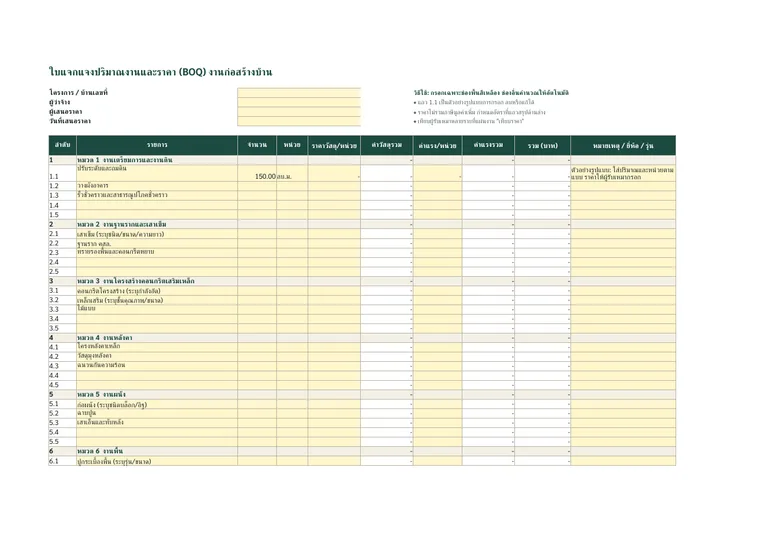
BOQ template (Excel)
You are getting prices from several contractors and want to compare them line by line.
5 problem spots to look for in a BOQ
- "Lump sum" or "lot" items with no quantity. You cannot check what they include, so ask for them to be broken down.
- Missing items, such as the septic tank, fill, fence or meter applications. If they are neither in the BOQ nor on the exclusions list, they become extras later.
- Provisional sums, such as "sanitary ware allowance 50,000 baht". Know how the difference is charged if you choose something more expensive.
- Quantities far from the drawings. If concrete or steel quantities differ a lot from other bids, the take-off may be wrong, or quantities may have been cut to make the price look low.
- No brand or model. Price differences often come from material grade. Specify the same grade for every bidder before comparing.
How to compare 3 quotations
Send every contractor the same drawings and the same material list, and ask them to price the same BOQ form. Then compare group by group, not just the total. Groups with large price gaps are where you ask more questions. The cheapest price is not always the best choice if it is cheap because work was left out or a different grade was used.
Our BOQ template has a "compare prices" sheet that places each group total side by side and calculates the gap between the highest and lowest automatically.
Use the BOQ with the contract and payment schedule
The agreed BOQ should be attached as part of the construction contract and used as the basis for the payment schedule. When work is added or removed, use the BOQ unit rates in the change order. If a contractor abandons the job, the BOQ is how you calculate the value of the work done.
The BOQ we prepare for clients
Every job we take starts with a full itemised list: what is included and excluded, the quantities and the prices, before you agree to hire us. Send us your drawings or site photos and we will send back a first summary of the work.
Planning to build? See every item before you decide.
Send your location, plans or photos and we will come back with an initial scope of work.

Frequently asked questions
What does BOQ stand for?
BOQ stands for bill of quantities: an itemised list of construction quantities and prices.
How is a BOQ different from a quotation?
A quotation may show only a total. A BOQ lists every item with quantity, unit, material price and labour. A good quotation should come with a BOQ.
Who prepares the BOQ?
The designer, a cost estimator or the contractor takes the quantities off the drawings. Homeowners should give every contractor the same form to fill in so the prices can be compared.